
MOVING BEYOND SPREADSHEETS
When the project list lives in Excel, requests arrive by email and every status report is rebuilt by hand, your PMO spends its time maintaining files instead of improving decisions. Acuity PPM brings projects, requests, priorities, capacity and reporting into one structured system your teams will actually use.
Schedule a Demo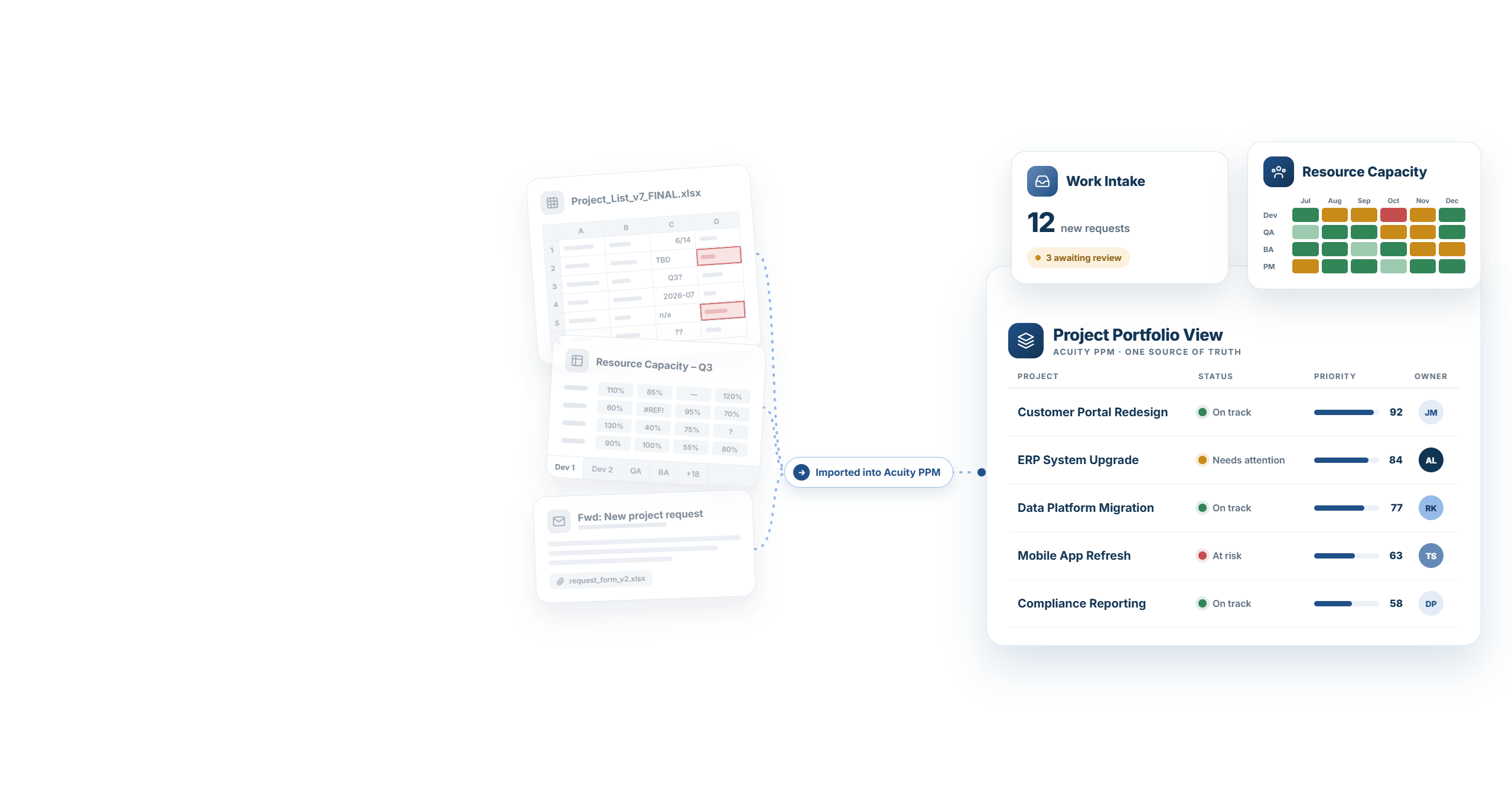
SOUND FAMILIAR?
Most PMOs start in Excel, SharePoint or Google Sheets. It works for a while. Then the same symptoms show up.
Every team adds its own columns, and no one is sure which version is current.
New work enters without consistent information, so every request gets evaluated differently.
Project managers copy the same updates into decks instead of managing their projects.
One tab per person, updated by hand, and still no clear view of who is available.
Without consistent scoring, the loudest voice in the room decides.
When data is stitched together by hand, every review starts with questions about the data.
FROM SPREADSHEET TO SYSTEM
Acuity PPM replaces the files and workarounds with one governed system of record for the project portfolio.
IN SPREADSHEETS
IN ACUITY PPM
A project list in Excel or SharePoint
A governed project list with consistent fields, views for each stakeholder group and one place to look.
ESSENTIALS+
Requests by email
Configurable intake forms, decision workflows and phase gates for every request.
ESSENTIALS+
Status decks rebuilt every month
Status reports with stoplights that roll up to dashboards and export to PowerPoint.
ESSENTIALS+
Capacity tabs updated by hand
Capacity vs. demand by person, role or team, with heatmaps and no per-resource license fees.
PLUS+
Priorities set by debate
Weighted value and risk scoring and a live Priorities page leaders review together.
ESSENTIALS+
“Which version is current?”
One source of truth, with a full audit log of who changed what and when.
ESSENTIALS+
SEE IT IN ACUITY PPM
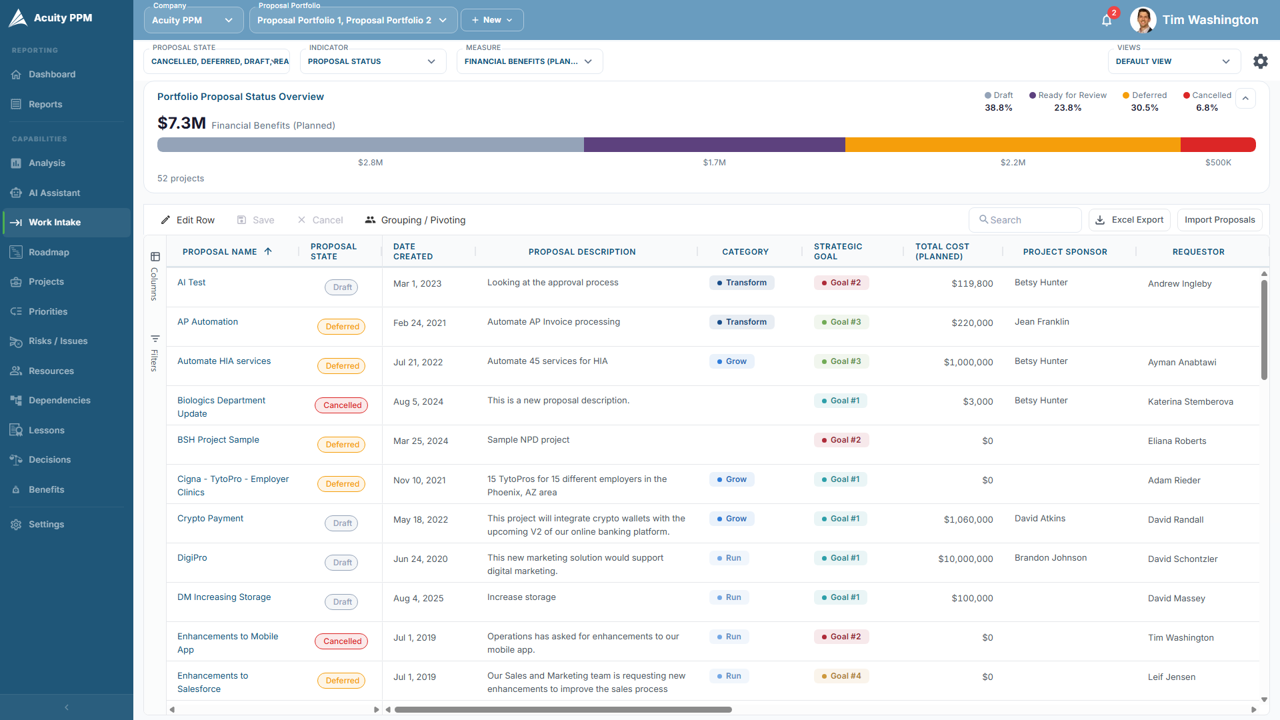
Configurable intake forms replace email and spreadsheet requests, so every proposal arrives with the information needed to evaluate it.
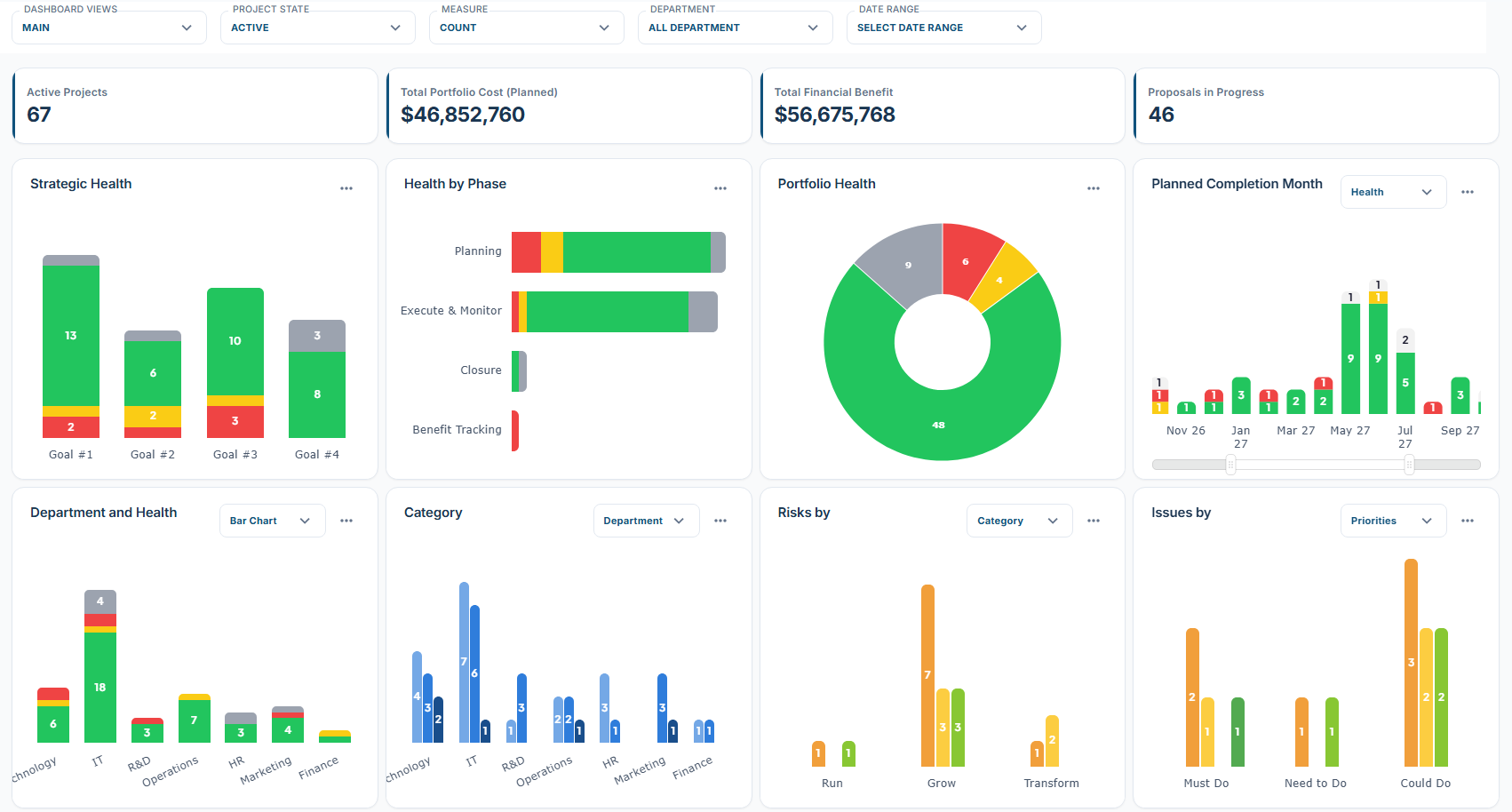
Dashboards update as projects update, so nobody has to consolidate a spreadsheet before the steering committee meets.
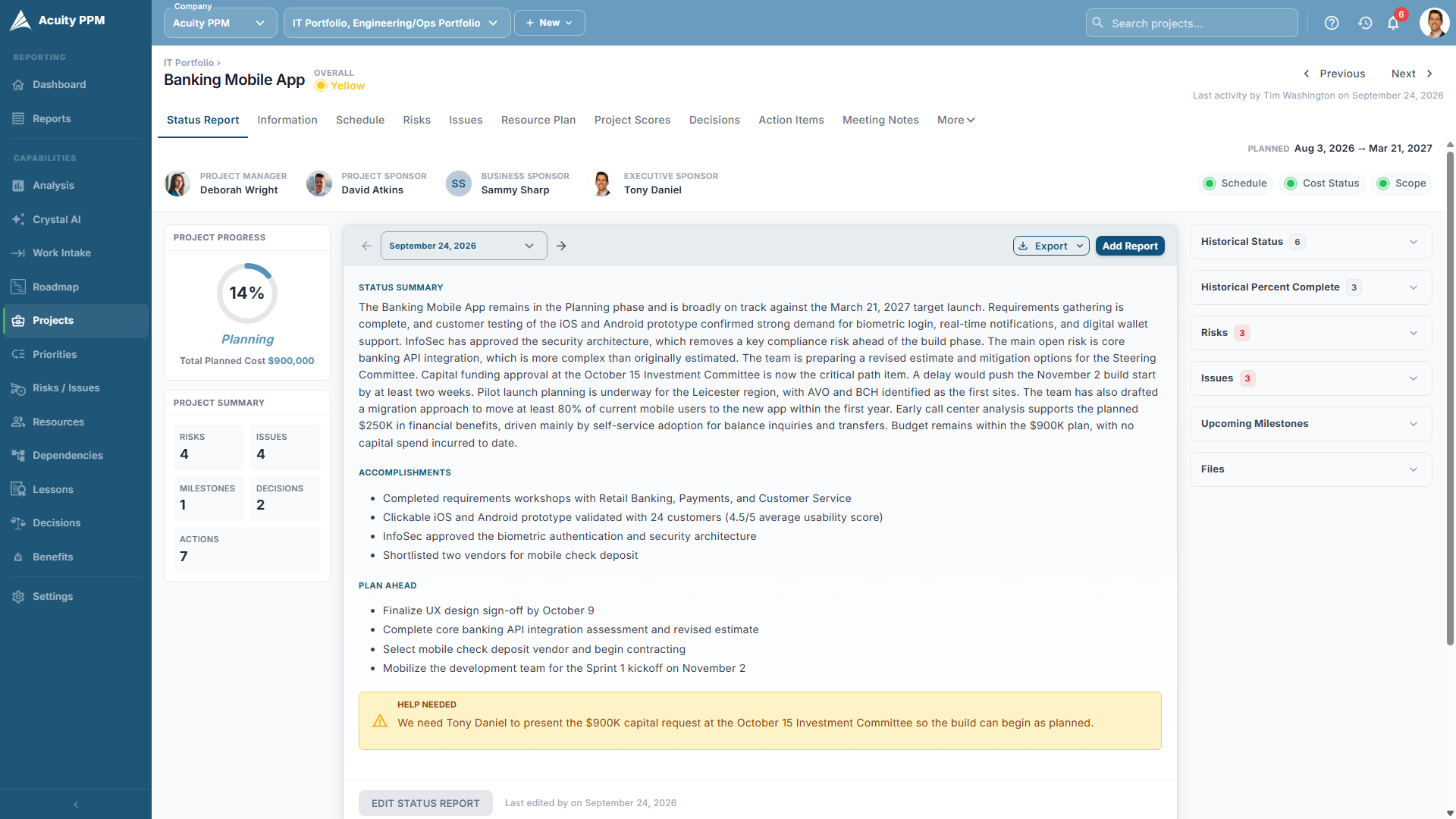
Project managers update once. Stoplights for schedule, budget, scope, risk, resources and benefits roll up automatically and export to PowerPoint.
RIGHT-SIZED AND COMPLETE PPM
Acuity PPM is easier to adopt than traditional enterprise PPM, without giving up the disciplines a growing PMO needs.
Excel and CSV import and export, plus Microsoft Project .mpp import, so nothing gets retyped.
250 Reader licenses included, so executives and stakeholders can see the project portfolio without extra cost.
Start with the practices your PMO needs now, then expand capabilities as you mature.
“We were live within two weeks of signing our contract. Using Acuity is not a full-time job, unlike other PPM solutions.”
Gartner Peer Insights reviewer · 5/5
HOW THE MOVE WORKS
Processes built for spreadsheets rarely survive the move unchanged, and they don’t need to. A directional process is enough to begin, and Acuity PPM brings good practice from real PMO experience.
01
Send the project lists, request logs and capacity sheets you use today.
02
We load your data and configure intake forms, fields and views to fit how you work.
03
Begin with intake, your project data and status reporting. Your prioritization model can follow.
04
We train your PMO, project managers and executives, so everyone works from the same project portfolio.
CUSTOMER PROOF
CUSTOMER STORY · INSURANCE
THE SITUATION
The PMO updated 16 to 22 Excel tabs every month, one per developer, QA tester and business analyst. Every project added, completed or closed meant touching every tab, and there was still no holistic view of resources.
THE RESULT
Monthly resource planning now happens in a single forum with the development lead, QA manager and BA manager. It feeds a monthly C-level review that decides what to activate, hold, slow-burn or stop, all anchored in resource reality.
“Resource management with spreadsheets was very painful. We had to get out of the Excel/SharePoint world and Acuity PPM helped us do it.”
Chris C. · Director of Project Management, Insurance Company
CUSTOMER STORY · TRANSPORTATION
Central Ohio Transit Authority moved capital planning out of a separate spreadsheet exercise and into the same annual planning process as its operational projects.
“The big win for us is that now we’ve got capital planning and our Opex planning together in one tool.”
Matt Martin · Sr. Director PMO, Central Ohio Transit Authority
RECOGNIZED BY PMO TEAMS
PPM Midmarket · 2023–2026 · SoftwareReviews
PPM Midmarket · 2025–2026 · Info-Tech
Summer 2026 · rated 4.6
Project & Portfolio Management
THEN ADD INTELLIGENCE
Once your project portfolio lives in one governed system, Crystal AI can draft status reports from project data, send weekly AI digests and answer questions only from data you can see. AI prepares. People decide.
Explore Portfolio Intelligence →FAQ
Yes. Acuity PPM imports Excel and CSV files, and Microsoft Project .mpp files for schedules. During onboarding, we load your data for you.
No. A high-level, directional process is enough to start. Many processes were designed around spreadsheets, so the process and the configuration usually mature together. Intake, project data and status reporting can start while your prioritization model is still taking shape.
Yes. Data exports to Excel and CSV, status reports export to PowerPoint, and Power BI connects for deeper analysis.
Implementations are typically measured in days or weeks, not months. Timing depends mostly on how quickly your data is ready and your fields and views are agreed.
Yes. Teams can keep running execution in Smartsheet, Monday.com, Jira or Planner, while Acuity PPM adds the project portfolio layer for intake, prioritization, capacity and executive reporting.
KEEP EXPLORING
Bring one project portfolio question to a 30-minute Portfolio Decision Review. We’ll show you the workflow that answers it.